
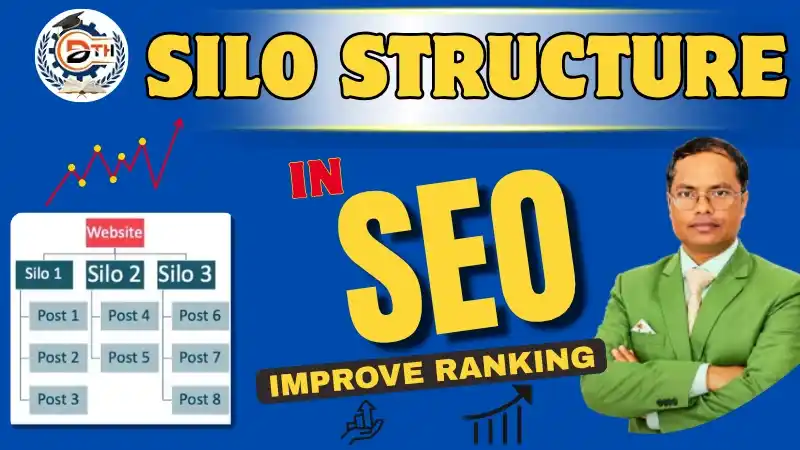
Hello dosto! Is article me aaj hum Silo Structure jo ki SEO ka ek important topic hai uske bare me smjhege.
aapki jo website hai usme bhut se pages aur articles pages hai, par users aur Google ko unke beech ka relation samajhne mein kafi muskil hoti hai? Agar haan, to Silo Structure aapki website ke content ko properly organize karne mein help kar sakta hai.
Is article mei aaj pdhenge ki Silo Structure kya hota hai, kis trike se kaam karta hai aur website ki SEO performance ko better karne me kaise support kar sakta hai.
What Is Silo Structure in SEO?
Silo Structure website architecture ki ek aisi technique hai, jismein related pages aur content ko logically organize kiya jata hai.
यदि आप SEO Course सीखना चाहते हैं तो हमारी Technical Team से बात कर सकते हैं!
(HR: 9034756711 | MD: 9017940459)
Ishka main purpose website ke content ko clear categories mein divide karna hota hai, taaki users aur Google ke bots apki website ke structure aasani se samj sakein.
Example: Digital Marketing Website
Maan lijiye aapki ek Digital Marketing website hai, jismein ye topics cover kiye gaye hain:
- SEO
- Social Media Marketing
- Google Ads
- Email Marketing
Agar aap in sabhi topics ko alag-alag relevant categories mein organize karte hain, toh users apni requirement ke according content easily search kar sakenge.
Saath hi, Google ke bots ke liye bhi related pages ko discover karna aur unke topics ko samajhna aasaan ho jata hai.
How Does Silo Structure Work?
Silo Structure mein website ke content ko main categories aur unse related subcategories mein organize kiya jata hai.
Complete Lesson in This Video; So Watch Completely!! 👇 👇 👇
For example:
- Digital Marketing
- SEO
- On-Page SEO
- Off-Page SEO
- Technical SEO
- Social Media Marketing
- Google Ads
- Email Marketing
- SEO
Is structure mein SEO se related content SEO category ke andar organize hoga, jabki Social Media Marketing se related content uski relevant category mein rahega.
Isse users ko apni requirement ke according information milti hai aur website ka navigation simple rehta hai.
Real Website Example: Silo Structure
Digital Thinker Help ki educational website par courses, articles aur training-related content ko different sections mein organize kiya ja sakta hai.
Example: If a user wants details about Off-Page SEO they can go to the category and access articles, images and videos related to that topic.
Similarly if there are course and training pages for cities in Haryana on the website they should be organized according to location; this makes it very helpful, for users.
Is tarah ka organized structure website par information find karna easier bana sakta hai.
Why Is Silo Structure Important for SEO?
Better Website Organization
Silo Structure website ke content ko properly organize karne mein help karta hai.
Jab related articles ek logical category ke andar hote hain, to users ko required information find karne mein kam difficulty hoti hai.
Improved Internal Linking
Internal linking ka matlab hai apni website ke ek page ko doosre relevant page se link karna.
For example, if you have written an article about On-Page SEO you can add a link to another article that is related to On-Page SEO in places.
This gives users information and helps search engines find related pages, about On-Page SEO.
Better Topical Context
Jab aap kisi ek topic par useful aur related content publish karte hain, to website par us topic ki information systematically available hoti hai.
For example, SEO ke andar keyword research, On-Page SEO, Off-Page SEO aur Technical SEO par articles publish karna users ko topic samajhne mein help kar sakta hai.
Better User Experience
Agar website ka structure simple aur clear hai, to users apni requirement ke according pages easily access kar sakte hain.
Relevant categories, clear navigation aur useful internal links website ko use karna easier bana sakte hain.
Note: Silo Structure se ranking improve hone ki guarantee nahi hoti. SEO performance content quality, search intent, technical health aur doosre factors par bhi depend karti hai.
How to Create a Silo Structure on Your Website?
Step 1: Identify Your Main Topics
Sabse pehle apni website ke main topics identify karein.
Digital Thinker Help – digital marketing company based institute that stands out from the rest.
Aapki website Digital Marketing, Beauty, Fitness, Education ya kisi bhi doosre niche par based ho sakti hai.
For example, Digital Marketing website ke main topics ho sakte hain:
- SEO
- Social Media Marketing
- Google Ads
- Email Marketing
Step 2: Do Keyword Research
Main topics identify karne ke baad unse related keywords research karein.
Sirf keywords find karna enough nahi hai. Users kya search kar rhe hai kyu kr rhe hai unka ye intent bhi smjhna jruri hai, taki aap asani se users ki requirment ke according helpful information de sakein.
Step 3: Create Relevant Categories and Subcategories
Main categories ke andar relevant subcategories banayein.
For example:
SEO
- On-Page SEO
- Off-Page SEO
- Technical SEO
- Local SEO
Har category ka clear purpose hona chahiye. Unnecessary categories create karne se bachein.
Step 4: Improve Internal Linking
Related articles ko relevant internal links ke through connect karein.
Anchor text descriptive rakhein, taaki users ko samajh aaye ki link par click karne se unhe kis topic ki information milegi.
For example, On-Page SEO article se related On-Page SEO guide ko link karna useful ho sakta hai.
Dhyan rakhein ki links natural aur relevant hone chahiye. Sirf strict category boundaries maintain karne ke liye useful links ko avoid na karein.
Step 5: Check URLs and Website Navigation
Website ke URLs simple aur descriptive rakhein.
For example:
example.com/seo/on-page-seo/
Aise URLs users ko page ke topic ka idea de sakte hain.
Website ka navigation menu bhi clear rakhein, taaki users easily main categories aur subcategories tak pahunch sakein.
Step 6: Use Breadcrumbs Where Helpful
Breadcrumbs website par user ki current location dikhate hain.
Example:
Home → Digital Marketing → SEO → On-Page SEO
Isse users ko website ke structure ko samajhne aur previous categories par wapas jaane mein help mil sakti hai.
WordPress website mein suitable plugins ke through breadcrumbs implement kiye ja sakte hain.
Step 7: Monitor Website Performance
Google Search Console ke through website ki indexing aur search performance monitor karein.
Check to make sure the important pages are being indexed or not which pages are appearing in the search results and whether there is any problem in discovering any page.
Regular monitoring can help identify issues, in the website structure and internal linking.
Common Silo Structure Mistakes to Avoid
Mistake 1: Creating Too Many Categories
Har article ya har keyword ke liye separate category banana zaroori nahi hai.
Categories tabhi create karein jab unka clear purpose ho aur unke andar relevant content organize kiya ja sake.
Mistake 2: Ignoring Internal Linking
Agar related articles ek-doosre se linked nahi hain, to users ke liye additional information discover karna difficult ho sakta hai.
Isliye relevant pages ke beech natural internal links add karein.
Mistake 3: Writing Content Only for SEO
Content ka main purpose users ko useful information dena hona chahiye.
Sirf keywords add karne ke liye unnecessary ya unnatural content publish na karein. Pehle user ki requirement samjhein aur phir content ko naturally optimize karein.
Mistake 4: Leaving Important Pages Without Internal Links
Maan lijiye aapki website par ek important SEO Course page hai, lekin related articles se ush page ka koi relevant internal link nahi milta hai.
Aisi situation mein users ke liye us page tak pahunchna difficult ho sakta hai.
Important pages ko relevant categories aur supporting articles se link karein, taaki users unhe easily discover kar sakein.
Mistake 5: Making Website Navigation Complicated
Website ka structure itna complicated nahi hona chahiye, jishse ki users ko required information find karne mein problem na ho.
Main categories, subcategories aur navigation ko simple aur understandable rakhein.
How Does Silo Structure Improve User Experience?
Ek organized website users ko information easily find karne mein madad karti hai. I think this is very useful.
For example, agar Kisi user ko Technical SEO seekhna hai, toh woh SEO category ke andar Technical SEO se related articles access kar sakta hai.
Isse user ko relevant information mil sakti hai aur website browse karna easier ho sakta hai.
Website ko design karte waqt different knowledge levels ke users ko dhyan mein rakhein, taaki beginners aur experienced users dono content ko easily understand kar sakein.
Final Remarks
Silo Structure website ke related content ko logically organize karne ka ek useful method hai.
Clear categories, relevant internal linking, descriptive URLs aur simple navigation users ko information easily find karne mein help karte hain. Saath hi, search engines ko website ke pages discover karne aur unke relationships ko samajhne mein madad mil sakti hai.
Isliye website ka structure banate waqt user experience, relevant content aur natural internal linking par focus karein.
If this content is valuable for you, then please share it along with your friends, family members, pet lovers or relatives over social media platforms like as Facebook, Instagram, LinkedIn, Twitter, and more.
Do you have any experience, tips, tricks, or query regarding on this? You can drop a comment!